
The two middle panels: what they bought, and what it added up to.
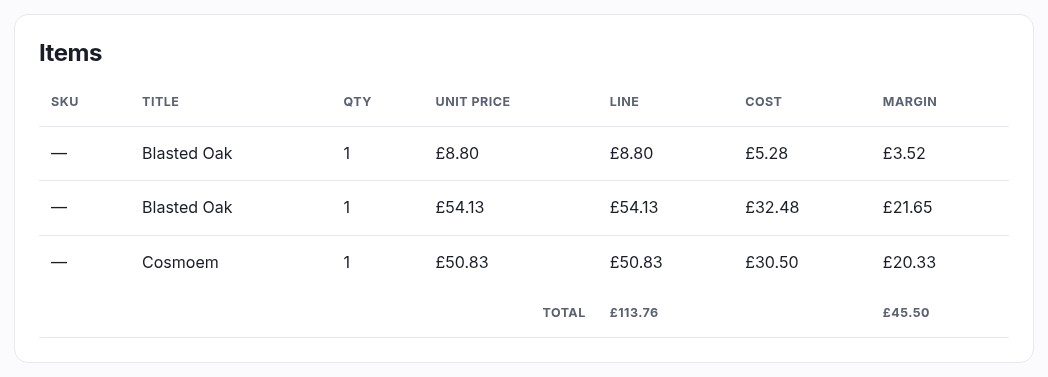
Items
| Column | What it is |
|---|---|
| SKU | Your code for the exact variant sold — the printing, the condition, the language. A dash means the line had no SKU (a ticket or a gift card). |
| Title | The product name as it was when sold, stored on the line. Rename the product later and this order still shows what the customer bought. |
| Qty / Unit price / Line | How many, at what each, coming to what. |
| Cost / Margin | Only if your plan includes cost tracking. Cost is what that unit cost you; margin is the difference times the quantity, with the order's total margin in the footer. A dash means no cost was recorded for that line, and it's left out of the total rather than counted as free. |
Totals
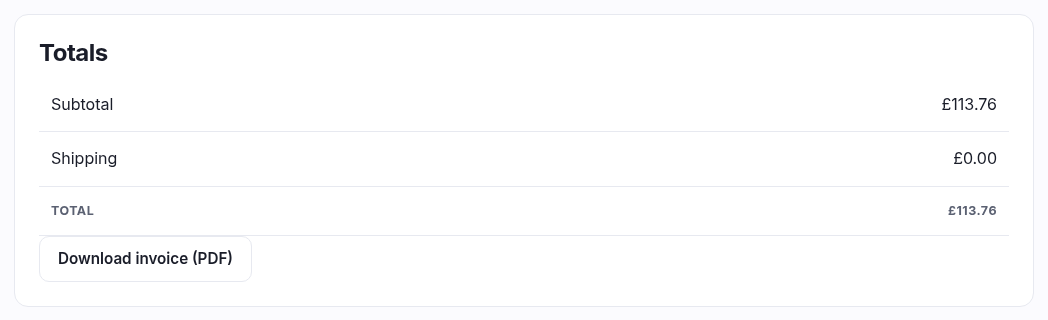
Rows only appear when they apply, so a plain order is four lines and a complicated one is seven:
| Row | When it shows |
|---|---|
| Subtotal | Always — the goods before anything else. |
| Discount | Only if a code was used. The code itself is named in brackets, which is how you find out which promotion cost you this. |
| Shipping | Unless it was a collection. The service they chose is named in brackets. |
| incl. VAT | Only if the order carried VAT, with the rate that applied. It's included in the total, not added to it — prices in this shop are VAT-inclusive. |
| Total | What was actually charged. |
| Refunded | Only once some money has gone back. Total minus this is what you've kept. |
Download invoice (PDF)
Opens a proper invoice in a new tab — your shop's name and address, the order number, the lines, and the VAT broken out if you're registered. This is the document to send a customer who asks for one "for the accountant". It's generated fresh each time from the order, so it always matches what's on screen.