
The last panel, and the one to read before you use it. A refund cannot be undone, and depending on how they paid, it may move real money the moment you press the button.
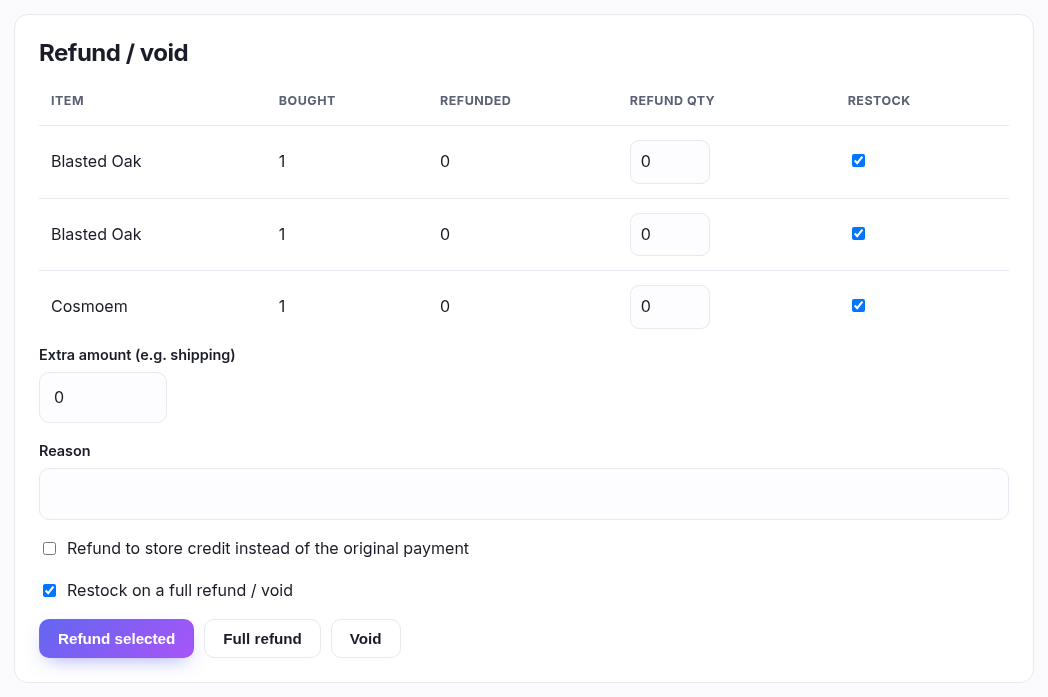
Three buttons, three different jobs
| Button | What it does |
|---|---|
| Refund selected | Refunds exactly the quantities you typed in the table, plus anything in Extra amount. This is the one for "one card arrived bent". |
| Full refund | Returns everything still outstanding, ignoring the table. On a part-refunded order that's the remainder, not the original total — you can't refund more than was charged. |
| Void | A full refund and it cancels the order. Asks you to confirm first. Use it for "this should never have happened"; use Full refund for "they sent it back". |
The line table
One row per item with anything left to refund. Bought and Refunded show where each line stands, and Refund qty won't let you exceed what's left. Lines already refunded in full drop off the table entirely.
Restock is ticked per line. Leave it on for a card that came back saleable; turn it off for one that came back damaged, or you'll be putting a bent card back into your stock count.
Not everything can be refunded line by line. A line with no product behind it — an event ticket, a gift card — doesn't appear in this table at all. To give that money back use Full refund, or type the amount into Extra amount.
The other fields
| Field | What it's for |
|---|---|
| Extra amount | Money not tied to a line — refunding the postage, or a goodwill few pounds. Added on top of the lines you selected. |
| Reason | Free text, kept on the refund record. Worth filling in: in six months it's the only thing that says why. |
| Refund to store credit instead | Only if your plan includes store credit. Puts the money on the customer's account rather than back where it came from. Good for goodwill, and it keeps the money in the shop. |
| Restock on a full refund / void | The whole-order version of the per-line boxes, used by the Full refund and Void buttons. |
Where the money actually goes
Unless you tick store credit, a refund retraces how they paid, in a fixed order, and only ever up to what was taken on each:
- The original tender first — the card for a web order; for a till sale whatever they actually paid with, so cash goes back as cash and your drawer still balances.
- Then any gift card they used.
- Then any store credit they used.
Anything left over — a cash order, or an odd penny — is recorded rather than sent, and the confirmation message tells you so: "recorded, return the money manually". That means the books are right but you still have to hand the money over. It is not a failure message, and pressing the button again would refund twice.
What the customer sees
For a web order they get a refund email. A till refund sends nothing — they're standing in front of you.
When the panel isn't there
Either there's nothing left to refund (already fully refunded, or the order never took payment), or your role doesn't include refunds. Refunding is a permission of its own, separate from viewing and from dispatching, so plenty of staff will never see this panel.