
Every order your shop has taken, in one list — website checkouts and till sales together, newest first, 25 to a page. It's the page you work from in the morning: what came in overnight, what's paid and still needs packing.
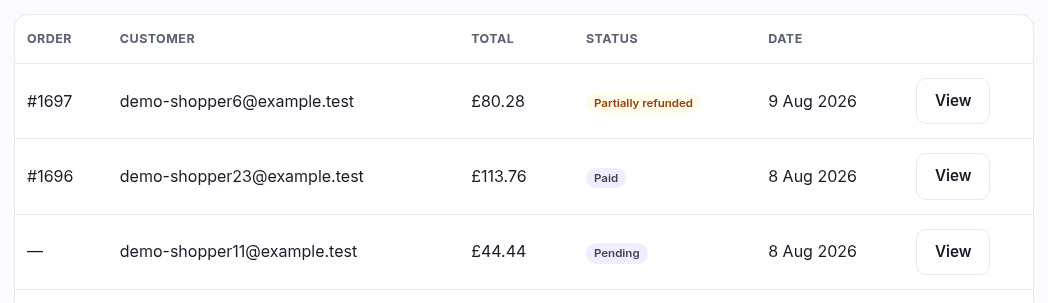
What each column tells you
| Column | What it is |
|---|---|
| Order | Your order number, as #1042. It's yours alone — your first order is #1000 and it counts up from there, whatever any other shop on the platform is doing. The same number is on the customer's confirmation email, the invoice and the till receipt, so it's what you ask for when someone rings up. A row showing a dash instead is an unpaid attempt that never became an order — see the Pending badge below. |
| Customer | The email address on the account that placed it. A till sale to someone without an account shows a dash — the sale is still yours, it just isn't attached to anybody. |
| Total | What the customer actually paid, VAT included, in the currency they paid in. If you sell in more than one currency you'll see more than one symbol down this column, and the numbers don't add up to a single figure — the sales report is where you get totals. |
| Status | Where the order has got to. See below. |
| Date | The day the order was placed, in your shop's timezone (set under Settings ▸ Store details). |
| View | Opens the order. |
The status badges
| Badge | What it means |
|---|---|
| Pending | Started but never paid — the customer closed the tab at the card step, or the card was declined. Nothing shipped, no money moved, nothing for you to do. It has no order number yet, which is why the first column shows a dash: numbers are handed out when the money arrives, so your real orders run 1000, 1001, 1002 without gaps where somebody abandoned a basket. |
| Paid | Money received. This is your work queue. |
| Shipped | You've marked it dispatched and the customer has had the email. |
| Refunded | The whole amount has gone back. |
| Partially refunded | Some of it has gone back — one line off a five-line order, say. The rest still stands. |
| Cancelled | The payment was voided before it ever settled. Different from a refund: the money never left the customer's account. |
If the list is empty
You'll see "No orders" — which on the All tab means exactly that, and on one of the other tabs just means nothing is in that state right now. Nothing is hidden from you here: if a member of staff can open this page at all, they see every order the shop has.
Who can see this page
Anyone whose role includes viewing orders. Marking an order shipped and refunding one are separate permissions on top of that, so a Saturday helper can be given the list without being given the ability to send money back. Set that up under Roles & permissions.