
A variant is the thing a customer actually buys: this product, in this condition (and this language, if you sell in several), at a price, with a stock count. A product with no variants cannot be bought at all.
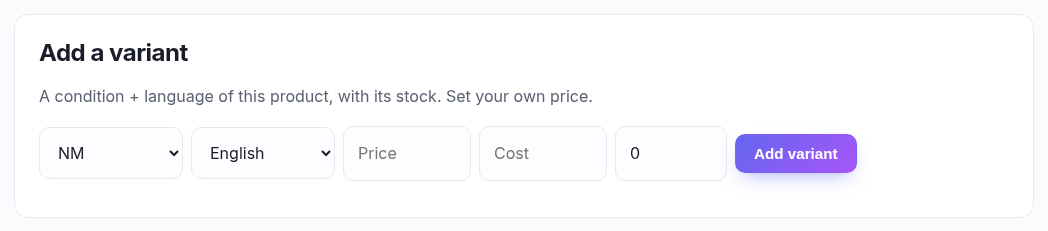
Adding one
| Field | What it is |
|---|---|
| Condition | NM, LP, MP and so on. The same card in two conditions is two variants at two prices — which is the whole reason variants exist. |
| Language | Only with the multi-language feature. |
| Price | What you charge. Pre-filled with a suggestion where one is known. |
| Cost | Only with cost tracking. What you paid. If you're VAT registered the box asks for it ex VAT, because your shelf price includes VAT and the two have to meet on the same basis. |
| Stock | How many you have. |
| Follow market price | Tick it and leave the price blank. See below. |
Follow market, or set your own
A variant is either priced by hand or follows the catalogue's market price converted into your currency. Following means it re-prices itself as the market moves and you never touch it again.
Switching to Follow market disables the price box rather than emptying it — your hand price is remembered and comes back if you switch off. And a variant that follows the market but has no reference price yet is badged Unpriced: it's not on sale, and the badge explains what's missing.
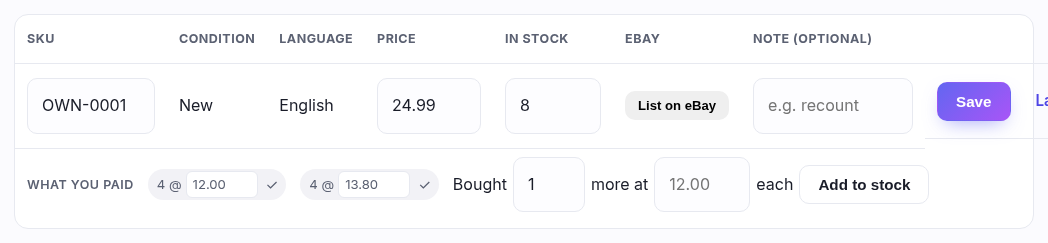
Editing a row
Every field on the row is editable in place, and the row's own Save commits it without reloading the page. SKU is your barcode — what the scanner reads at the till, so it must be unique in your shop. Note is logged against a stock change if you make one, and ignored if you don't.
"In stock" is a CORRECTION, not a delivery
The stock box re-states what you have — after a recount, a breakage, a miscount. It carries no price, so use it when the number was simply wrong. To record stock you bought, use Bought … more at … each on the row beneath, which is a different act with a different consequence.
Correcting upwards joins the new copies to the ledger at whatever the last ones cost; correcting downwards is shrinkage, and the cost goes with them. Neither is wrong — but a delivery typed into the correction box loses what you paid for it.
What you paid — one pill per purchase
With cost tracking on, each variant carries a line of what it cost, and
it is not one number. Each pill is a separate buy: 4 @ 12.00 and
4 @ 13.80 means eight in stock, bought at two different prices, and your margin
reflects which ones actually sell.
- Edit a cost in place and press ✓ — for a mistyped figure, or to write down a lot whose value has collapsed.
- A pill turns red when it cost more than the variant now sells for. That's stock you'll lose money on, visible without running a report.
- "3 with no cost recorded" means stock arrived without a price — an old correction, or something imported. It's not an error, just an unknown.
- Hovering a pill tells you when it was bought and where from. Stock taken in on the buylist is marked, because there's no VAT on it to reclaim.
Quantity isn't editable on a pill — how many you have is the stock box above. A pill says what a purchase cost, not how many are left of it.