
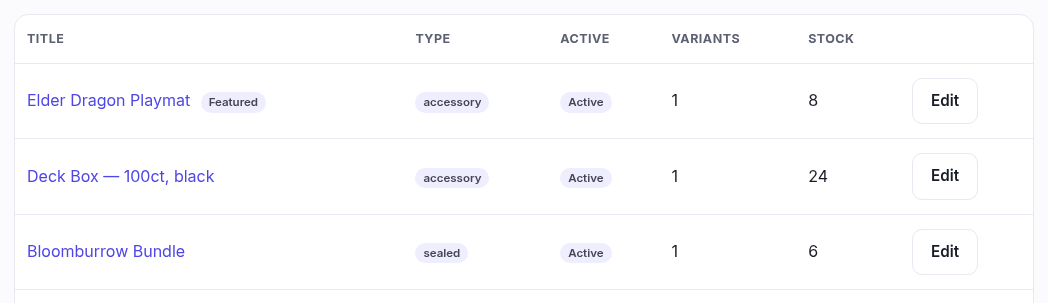
Only the products you created yourself — a sealed box you priced by hand, a playmat, a deck box, a table booking. It is not a list of everything you sell.
Why your cards aren't here
This is the distinction the whole area turns on, and it catches everyone once:
| Lives in | Why | |
|---|---|---|
| Things you invented playmat, sealed box, booking | This page | Nobody else has them. You wrote the title, you chose the picture, you set the price. |
| Things from the shared catalogue cards, sealed, accessories | Catalogue | We hold the artwork, set and market price for every printing. You pick which ones you carry. |
A shop carrying one set has thousands of catalogue listings, so mixing them in here would bury your four hand-made products under them. The blue note at the top of the page links straight across to the three catalogue tabs.
The columns
| Column | What it is |
|---|---|
| Title | What you called it. A Featured badge means you've flagged it for wherever your theme highlights products. |
| Type | Sealed, accessory, gift card or booking. It's a label, nothing more — nothing behaves differently because of it, so pick whichever reads best. |
| Active | Active means it's on the storefront. Hidden means it exists but nobody can see it — how you park something out of season without deleting it and losing its history. |
| Variants | How many versions it has. A playmat might be one; a t-shirt, four sizes. Each variant carries its own price, SKU and stock. |
| Stock | The total across every variant. Zero here doesn't necessarily mean hidden — it means nothing left to sell. |
Empty, and what that means
A brand-new shop sees "No products of your own yet" even with thousands of cards in stock, and that's correct — you haven't invented anything yet. If you've searched or filtered, the wording changes to "match that", which is the difference between nothing here and nothing matching.
Who can use it
Viewing needs permission to view products; creating and editing need manage products. Without manage, + Create product isn't on the page at all.