
Where shoppers fall out between picking something up and paying — and who to chase.
How to read the funnel
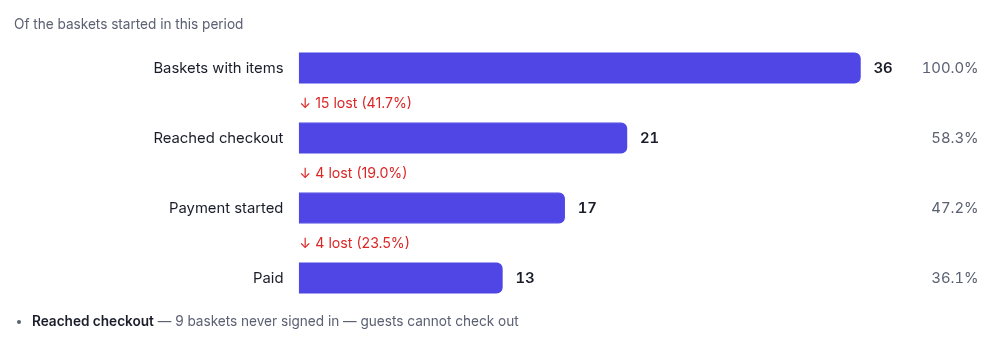
Every bar is measured against the same group of baskets: the ones started in the date range you chose. Each stage is that group filtered by how far it got, so the bar widths are the real conversion rate, and the drop-off between stages is called out.
- Baskets with items — someone put something in a basket.
- Reached checkout — they opened the checkout page.
- Payment started — they got as far as the card step.
- Paid — the money went through.
A note under "Reached checkout" tells you how many baskets belonged to shoppers who never signed in. That's not indecision — checkout requires an account, so those people were structurally unable to continue. It's usually the most actionable number here.
Recovered by reminders
Shown if you have Abandoned basket. It counts paid orders whose basket had already been sent a recovery reminder — i.e. revenue the reminder brought back, so you can see whether the feature earns its keep. Attribution only covers orders placed since this report shipped; older ones can't be linked back.
Abandoned payments
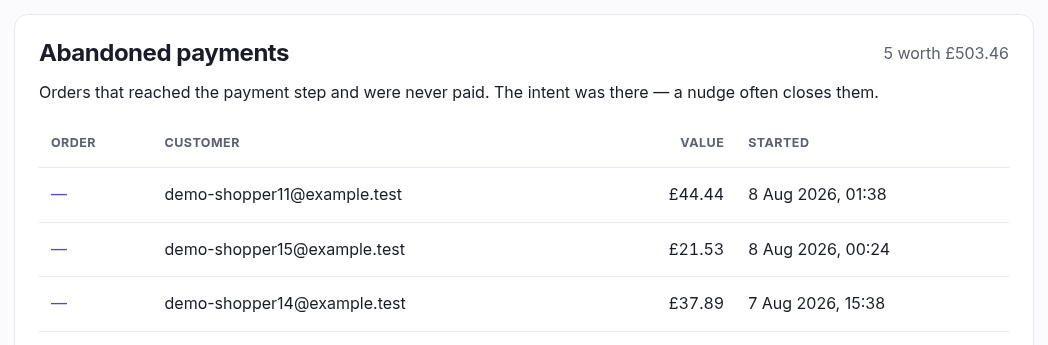
A list of orders that reached the card step and were never paid, with the customer and the value. These are the warmest leads you have — the intent was there and something went wrong. A short email or phone call often closes them.
Good to know
A basket started on the last day of the range may simply not have converted yet, so the most recent period always reads slightly low. That's inherent to following a group forward, not an error.