
What you'll pay when customers sell cards to you. You set a percentage of the market price per condition, with a store default and optional per-game or per-set overrides. Needs the Buylist feature.
The switch
Buy cards from customers is the master control — it puts "Sell to us" on the storefront. Off, and none of the rest applies.
Value limits
Guards applied to a card's market value. Leave any of them blank for no limit.
| Field | What it stops |
|---|---|
| No cash below | Cheap cards you'll only take for credit — stops you handing out coins for bulk. |
| No cash above | Caps your cash exposure on a single expensive card. |
| Don't buy below (credit) | A floor under which you won't take a card at all. |
| Default stock target | How many of a card you're willing to hold before you stop wanting more. |
The rate ladder
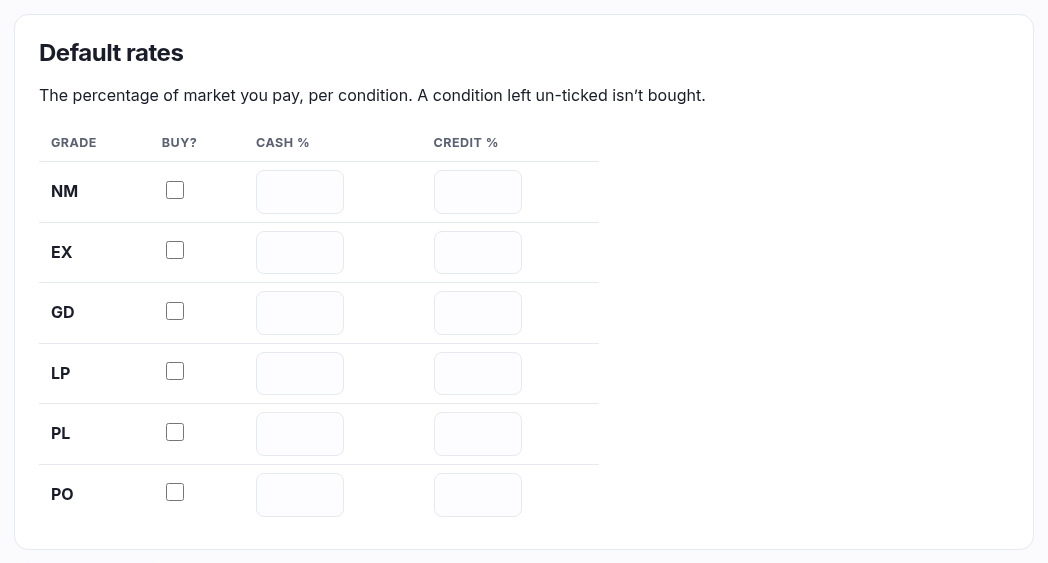
One row per condition (NM down to PO). For each you set:
- Buy? — untick a condition and you simply don't buy it.
- Cash % — the percentage of market you pay in cash.
- Credit % — the percentage you pay in store credit. Normally higher than cash, because credit comes back to you.
Worked example: a card with a £10 market price, NM at 40% cash / 55% credit, pays £4.00 cash or £5.50 credit.
Overrides

To pay differently for one game or one set, add an override. Pick the game first, then the set — where All sets (whole game) means the override covers that entire game. The set list only ever shows sets belonging to the game you chose, so an override is always a valid combination.
A new override starts as a copy of your default rates; edit its ladder in the section that appears above and press Save buy policy. Remove one and its cards fall back.
Which rate wins
Most specific first: a set override beats a game override, which beats the default — decided per condition. So you can override just NM for one set and let everything else fall through.
Cards you have priced individually
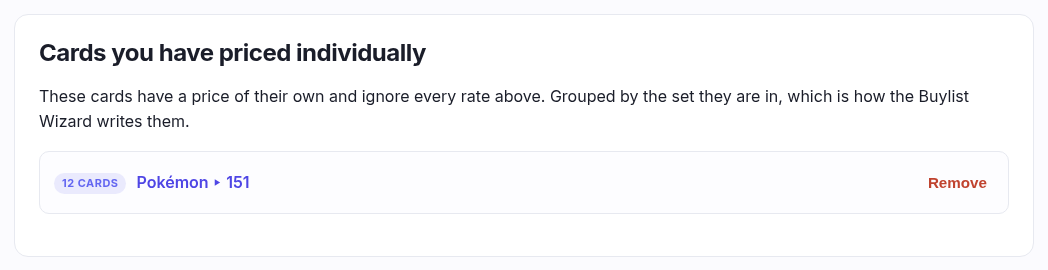
A price written onto a card beats every rate above. Those cards are listed at the bottom of this screen, grouped by the set they are in — which is how the Buylist Wizard writes them, a set at a time.
Remove forgets the whole group in one go and those cards go back to following your rates. It is the counterpart of removing an override: made in one go, undone in one go, rather than clearing three hundred cards one row at a time.
Languages
Rates can differ per language too, set under ⚙ Change rates on the Buy prices screen rather than here. What a foreign card is worth — the share of the English price it sells and buys at — lives on Catalogue ▸ Buy & sell config.