
A discount code is something a shopper types at checkout to take money off. This page is where you create them, decide exactly what they apply to, and set the limits that stop one costing more than you meant. It needs the Discounts feature on your plan.
Codes work online. The till has its own pricing and doesn't take web codes.
The three kinds of code
| Type | What it does |
|---|---|
| Percentage off | Takes a percentage off. 10 = 10% off. The only type that can carry a Max discount. |
| Fixed amount off | Takes a set amount off. It can never take off more than the qualifying goods are worth, so a £10 code on a £6 basket takes £6, not £10 — it can't push a total below zero or turn into credit. |
| Free shipping | Zeroes the delivery charge and leaves the goods at full price. The Value box disappears — there's nothing to set. |
The editor
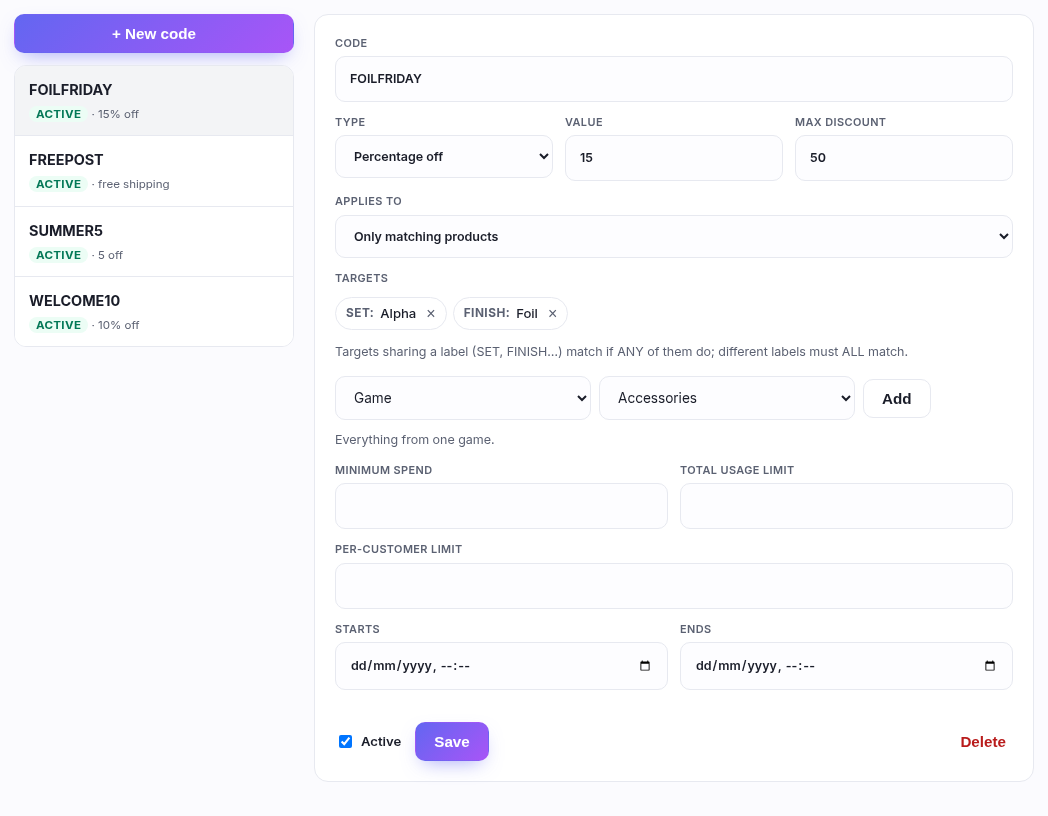
Codes are listed down the left with what they do and whether they're live. Click one to edit, or + New code to start. Nothing saves until you press Save.
| Field | What to put |
|---|---|
| Code | What the shopper types — WELCOME10. Stored in capitals and matched case-insensitively, so welcome10 works too. Must be unique in your shop; another shop can use the same word without clashing. |
| Type | One of the three above. |
| Value | The percentage or the amount. |
| Max discount | A ceiling, percentage codes only. "15% off, max £50" takes £50 off a £1,000 basket instead of £150. Blank = no ceiling. This is the field that stops a generous percentage becoming expensive on a big order. |
| Applies to | Whole basket, or Only matching products — see below. |
| Targets | What "matching" means. The heart of the page. |
| Minimum spend | The basket must reach this first. See the note on what counts. |
| Total usage limit | How many times the code can be used across all customers. Blank = unlimited. |
| Per-customer limit | How many times one customer may use it. 1 makes a "new customer" code. |
| Starts / Ends | An optional window. Leave both blank for "always on". |
| Active | Untick to pause a code without deleting it or losing its history. |
Targeting: deciding what a code applies to
Set Applies to to Only matching products and the code stops applying to the whole basket. Instead it applies only to the lines that match your targets — and everything else in the basket is charged in full.
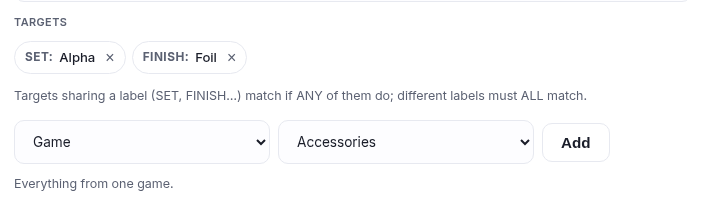
Choose what kind of thing from the first dropdown, the value from the second, press Add. Each becomes a chip; × removes it. You can target:
| Target | What it means | Where it comes from |
|---|---|---|
| Game | Everything from one game. | The card catalogue — facts about the card itself, which you never have to maintain. |
| Set | A specific set. Pick the game first to shorten the list. | |
| Rarity | Rare, Common, Enchanted — whatever the games you sell use. | |
| Card type | Minion, Aura, Avatar, and so on. | |
| Finish | Foil or Non-foil. | |
| Product type | Singles / Sealed / Decks. | The shared filter every shop on lgscommerce has. |
| Your own tags | Your menu categories, sub-categories and filter options. | Whatever you built in Navigation and Filters. |
The one rule: same label ANY, different labels ALL
Every chip carries a label — SET, FINISH, RARITY. That label is what decides how it combines:
- Chips sharing a label widen the code. Two SET chips mean "in either set".
- Chips with different labels narrow it. A SET chip and a FINISH chip mean "in that set and foil".
It's the same behaviour as the filters on your own storefront: ticking two boxes under one heading shows you more, ticking boxes under two headings shows you less. If you can filter your shop down to the products you have in mind, you can build a code that hits exactly those.
Worked scoping. "All Alpha and Beta foils":
SET: Alpha + SET: Beta + FINISH: Foil — three chips, two
labels. An Alpha foil qualifies. A Beta foil qualifies. An Alpha non-foil does not. A foil from
a third set does not.
Two things that surprise people
Foil means every foil. The Finish target is the broad sense, so it covers the special treatments too — Dust Foil, the Organized Play foils, and the rest. That is slightly wider than the Finish filter a shopper sees on your storefront, which lists each treatment separately. It's deliberate: "10% off foils" should mean all of them.
Card targets can't reach your own products. Game, Set, Rarity, Card type and Finish are facts from the card catalogue. A product you created — a playmat, a bundle, a deck box — has none of them, so those targets will never discount it, no matter how it's priced. To include your own products, tag them and target the tag instead.
The limits, and what they actually measure
Minimum spend
Measured against the products in the basket. Event tickets, gift cards being bought, and table or room bookings do not count towards it — so a shopper with a £40 event ticket and £12 of cards has spent £12 as far as a £30 minimum is concerned. It's also measured on the whole product subtotal, not just the qualifying lines: a targeted code can require a £50 basket while only discounting the foils in it.
Total usage limit
Counts completed orders, not attempts. A code sitting in ten baskets has been used zero times; the count moves when someone pays. So a "first 100 customers" code can't be exhausted by people who never check out.
Per-customer limit
Also counted on completed orders. Two things worth knowing:
- It requires the shopper to be signed in — there's no way to tell one guest from another. A signed-out shopper is asked to sign in rather than being refused.
- It's online only, because there's no customer identity at a till.
What the shopper sees when a code doesn't work
Each refusal says why. Worth knowing, because this is what you'll be shown a screenshot of when someone emails you:
| They see | It means |
|---|---|
| That discount code is not valid. | No such code in your shop — or it's unticked Active. |
| That discount code is not active yet. | Its Starts date is in the future. |
| That discount code has expired. | Its Ends date has passed. |
| Spend … to use this code. | Below the minimum spend. The amount they need is named. |
| That discount code has reached its usage limit. | The total usage limit is used up. Raise it or leave it. |
| Please sign in to use this code. | The code has a per-customer limit and they're browsing signed out. |
| You have already used this code. | They've hit their per-customer limit. |
| That code does not apply to anything in your basket. | A targeted code, and nothing in the basket matches. The usual cause is targets that are narrower than you intended — check whether you've combined two different labels that can't both be true. |
A code a shopper enters stays on their basket until they remove it, even while it doesn't qualify, with the reason underneath. Someone £8 short of a minimum can see that and go and spend it, and the code starts working by itself. They never have to re-type it to find out where they stand.
How a discount sits with everything else
Order matters, and this is the part worth reading twice — because a discount changes the tax and the other two don't:
- The discount comes off first, off the goods. It's a genuine reduction in price, so it reduces what VAT is calculated on.
- A gift card is applied next, as payment. It doesn't change the price of anything, so it does not reduce VAT — paying by voucher rather than card doesn't change the tax on the goods.
- Store credit comes after that, also as payment, same reasoning.
- Whatever is left is charged to the card.
A discount also never takes off more than is owed, and a percentage or fixed code discounts the goods only — never the postage. (Reducing postage is what Free shipping is for.)
VAT — which case are you?
- If you are VAT registered (a VAT number is saved in Settings ▸ Store details): your prices are VAT-inclusive, and the VAT is worked out on the price after the discount. A 10% code on a £120 basket means VAT is calculated on £108, and that lower figure is what appears on the invoice and the VAT report. You do not owe tax on money you didn't take.
- If you are not VAT registered: no VAT is charged or recorded either way, and the shopper simply pays your price less the discount.
What can't be discounted
- Event tickets — priced by the event, not the shop.
- Gift cards being bought — a £50 gift card always costs £50, or codes would be a way to mint money.
- Table and room bookings.
- Postage, except via a Free shipping code.
Worked examples
"£5 off orders over £30, first 100 customers, one each, this month."
SUMMER5 · Fixed amount off · Value 5 · Whole basket
· Minimum spend 30 · Total usage limit 100 ·
Per-customer limit 1 · Starts today, Ends month end.
A £32 basket pays £27. A £28 basket is told what to spend.
"15% off Alpha foils, but never more than £50."
Percentage off · Value 15 · Max discount 50
· Only matching products · SET: Alpha + FINISH: Foil.
An Alpha foil is discounted; an Alpha non-foil isn't, and neither is a foil from another set. On
£400 of qualifying foils it takes £50, not £60.
"10% off all singles."
Only matching products · PRODUCT TYPE: Singles — one chip, every game you
sell, now and in future.
"Free postage over £40."
Free shipping · Minimum spend 40 · Whole basket. The goods stay at full
price and the delivery line goes to zero.
Good to know
- One code per basket — a shopper can't stack two.
- A code's usage count moves when an order is paid, and it's recorded exactly once even if the payment confirmation arrives twice.
- Deleting a code stops it immediately and takes its targets and its usage history with it. Orders that already used it are untouched — they keep their own record of what was taken off. If you might want the history, untick Active instead.
- Changing a live code's targets takes effect on the next basket that uses it, not on orders already placed.
- A discount is spread across the qualifying lines in proportion to what each is worth, so a refund of one line refunds a fair share of the discount too.