
Who can sign in to your shop's admin, and what each of them can do. You are the owner — that account always has full access and can't be locked out.
Adding someone
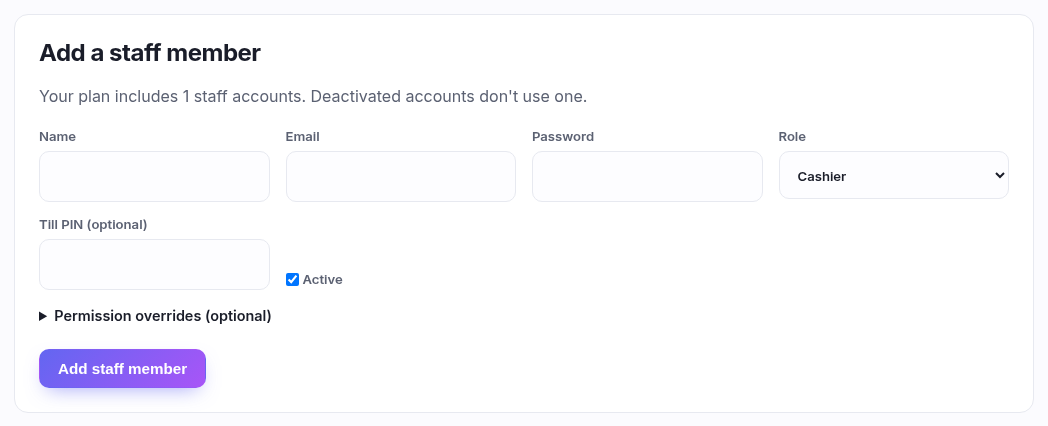
| Field | What to put in it |
|---|---|
| Name | Their name — it's what appears against the till sessions and stock moves they make, so use something you'll recognise on a report. |
| What they sign in with. Must be their own; two people sharing a login makes every audit trail useless. | |
| Password | At least 10 characters. Set one now and have them change it. |
| Role | The bundle of permissions they get — see Roles. Start with the closest fit; you can adjust with overrides below. |
| Till PIN | Optional, and worth setting for anyone who serves. It's the short code they punch in at the till to identify themselves on a sale, rather than typing an email and password at a busy counter. |
| Active | Untick to suspend someone without deleting them — a seasonal helper, someone on leave. Their history stays intact and they simply can't sign in. |
Permission overrides
Open Permission overrides to add or remove one permission on top of whatever the role gives. That's for the exception — "Cashier, but this one can also do refunds" — not for building a role a person at a time. If you find yourself giving three people the same overrides, make a role instead.
Managing existing staff

Each person is a row you expand. Inside you can change their name, email, role, till PIN and active flag, adjust overrides, reset their password, or remove them.
- You can't remove your own account — that's the guard against locking yourself out.
- Only the owner can hand out the owner role.
- Prefer unticking Active to removing. Someone who leaves and comes back keeps their history, and their past till sessions stay attributed either way.