
Add a section opens a menu of every type available on this page, each with a sketch of its shape.
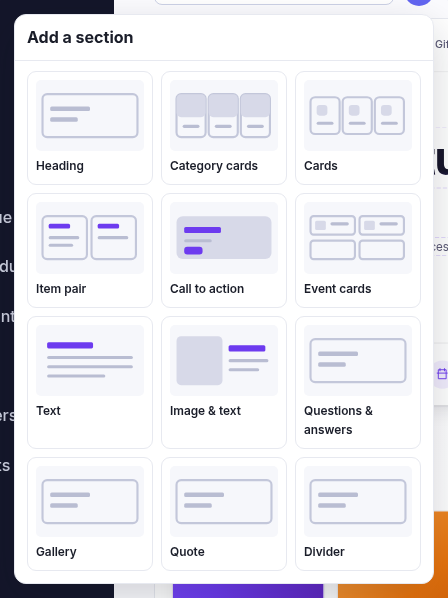
| Section | What it's for |
|---|---|
| Hero | The big slider at the top — a picture, a headline, up to two buttons, and a strip of trust badges under it. Several slides, advancing sideways. |
| Heading | A section title with an optional eyebrow above it. For breaking a long page into parts. |
| Category cards | Your shop's categories as cards, drawn from your menu. You don't type these — change them under Navigation. |
| Cards | The workhorse. Icon, eyebrow, title, body and a link, repeated. Feature tiles, a USP strip, opening hours. |
| Item pair | Two panels side by side — opening hours and where to find us, say. |
| Call to action | A banner or panel with a heading and buttons. "Make an account", "Sell us your cards". |
| Event cards | What's on, from your events diary. Needs the Events feature. |
| Products | A grid of products from a category you choose. Category pages only. |
| Text | Formatted copy, full width or a narrow column. |
| Image & text | A picture beside words — left, right, or full width. |
| Questions & answers | An FAQ, either click-to-expand or all open at once. |
| Gallery | Pictures, as a grid or a single row. |
| Quote | A customer quote, one or two side by side. |
| Divider | A line, or just space. For breathing room. |
Why a type might not be in your menu
The menu only offers what's valid here, so three things can remove one:
- The page type. A products grid makes sense on a category page and not on your contact page, so it's only offered there.
- Your plan. A hero needs the hero-slider feature, event cards need events. Without them the type simply isn't listed.
- One is already there. A page may have only one hero. The theme's slider script binds to a single one, so a second gets no arrows and its badges would fight with the first one's. Rather than let you build a broken page, the menu drops it once you have one.
Where it lands
The + in the top bar appends to the end. The + buttons in the preview insert at that spot — quicker than adding and then moving it up nine times.