
Everyone with an account at your shop, fifty to a page. It is a list and nothing more — every action, including adjusting store credit, lives on the customer's own record, because changing someone's money is a thing to do while looking at them rather than from a row in a table.
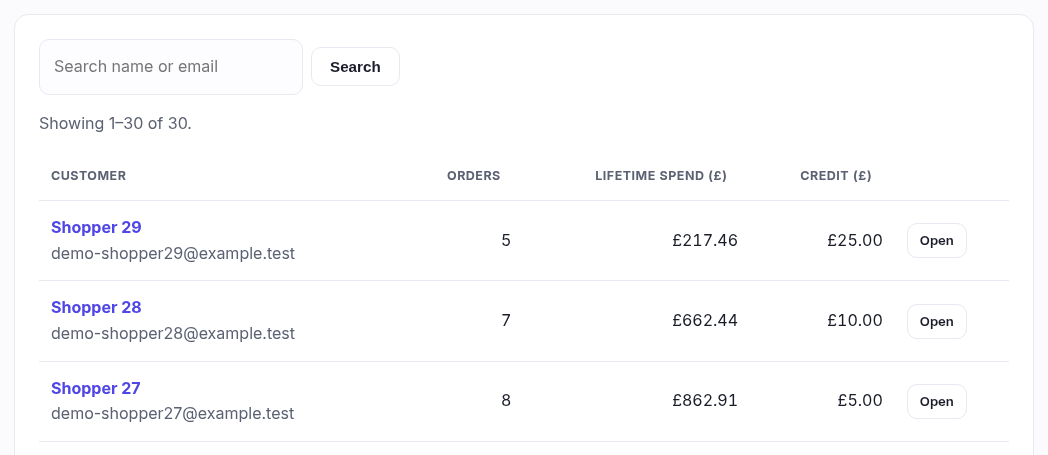
What each column tells you
| Column | What it is |
|---|---|
| Customer | Their name, with the email underneath. Someone who never gave a name shows a dash and is still perfectly findable by email. |
| Orders | How many orders they have actually paid for, online and in store together. Abandoned checkouts are not counted, so this is a real number of times they bought something. |
| Lifetime spend | What those orders came to, in your shop's current currency only. If you have ever changed currency, orders taken in the old one are counted separately and the row says "+2 in another currency" underneath — adding two currencies together would be a made-up number. The breakdown is on their record. |
| Credit | Store credit they are holding right now. Money you owe them, in effect. |
Who is NOT in this list
The till's walk-in customer is deliberately hidden. It is a single shared placeholder every anonymous cash sale is attached to, not a person, and leaving it in would put a phantom account at the top of your best-customers list holding thousands of pounds of lifetime spend. Those sales still count in your reports; they just have nobody to attribute them to. Scanning a patron fob at the till is what turns a walk-in sale into a named one.
Above the table
A line reads Showing 1–50 of 412, so you always know whether you are looking at the whole list or the first page of it. An empty list says either No customers yet or No customers match, which are different problems.