
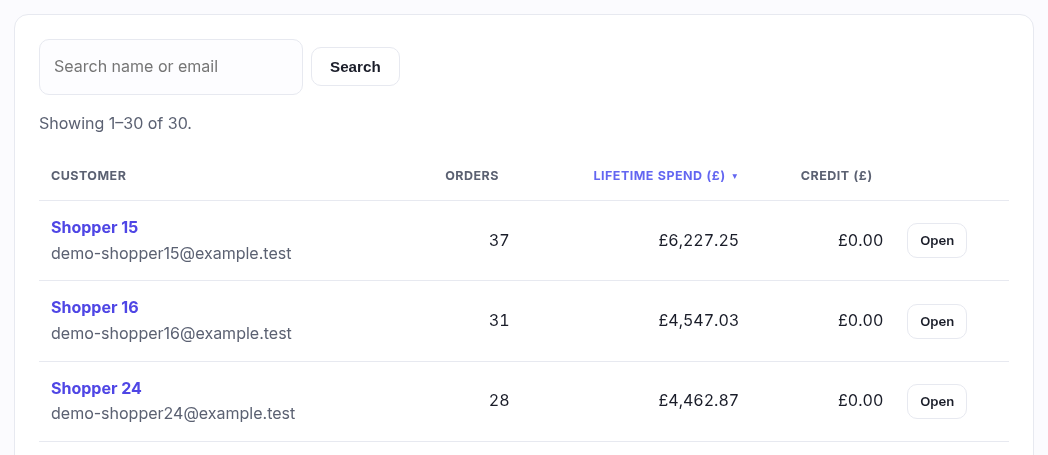
Two controls, and the sorting is the one worth knowing properly — it turns this list into several different reports.
Search
Matches on first name, last name or email, and a partial is fine — "smi", "@gmail". It is not a whole-word match, so searching "an" finds Daniel and Joanna too.
Searching keeps the sort you were on. Sort by lifetime spend, then search for "gmail", and you get gmail customers still ranked by spend rather than being thrown back to newest-first. Clear drops the search and keeps the sort.
Sorting — click a heading
Four of the five headings are links. Clicking one sorts by it; clicking the one you are already on reverses it. A small caret (▲ or ▼) marks the column in use and which way it is running, so you can always tell which of the four you are looking at.
| Heading | First click gives you | What it answers |
|---|---|---|
| Customer | A–Z by first name | "I know roughly what they're called." Ascending first, because that is the only useful direction for a name. |
| Orders | Most orders first | "Who comes back?" Regulars by visit count, regardless of what they spend. |
| Lifetime spend | Biggest spender first | "Who actually matters to the business?" The one to use before a launch or an invite-only event. |
| Credit | Largest balance first | "Who is holding my money?" Useful before a stocktake, and for spotting a balance nobody is spending. |
The money and count columns start descending on the first click, because the question being asked is always "who is at the top". Click again for the other end of the list — sorting up by Orders is how you find accounts that registered and never bought.
Two details that save confusion
- The default is newest first — the most recently registered account is at the top until you sort by something else. There is no heading for it, so to get back to it, clear the sort by returning to Customers from the menu.
- Customers with nothing tie, and stay put. Everyone with no orders has a count of zero and no spend, so a page boundary could otherwise show you the same person twice or skip one. They are held in a stable order behind the scenes, which is why sorting by spend still gives you a sensible list of the people who have never bought anything.
The sort is in the address bar
Whatever you have picked shows up in the page address as ?sort=spend&dir=desc,
and the pager carries it with you — page 2 of "biggest spenders" is still biggest spenders. It
also means a view you use often can simply be bookmarked.